
 Baseline
Simple Mode: prompt optimization with fewer decisions
Simple Mode is the fastest way to improve a prompt in Baseline. Paste the prompt, add a handful of test inputs, and the run tries rewrite after rewrite, scores each one against your Rubric on the same inputs, and hands back the best version it found. It is the default Mode when you optimize a pasted prompt, and it asks you for exactly one real decision: how many scored calls you want to spend.
What it is, and why it matters
An Optimization Run in Simple Mode is a tournament of rewrites. Your pasted prompt is the first Candidate and gets scored on the full set of test inputs, called Instances, to set the baseline. Each round then produces up to 8 new Candidates: each starts from one of the current best prompts and rewrites it in one of five ways, such as making it more specific, adding a worked example, restructuring it as numbered steps, tightening it, or reframing its perspective.
Every Candidate is scored on the same frozen Instances by the same Rubric, so scores are directly comparable. After each round the run keeps the top 3 and rewrites from those. It stops when it hits the rollout budget, the round cap, or several rounds in a row with no improvement, and completes on the best Candidate found, with its score shown next to your original prompt's.
The other Optimization Mode, Reflective, reads the judge's written reasoning on recent scores and proposes prompts informed by that feedback. Choose Simple for a narrow, well-defined task such as a JSON formatter, a classifier, or an extractor, where the score already tells the whole story. Switch to Reflective when the Rubric's criteria are nuanced, like tone or judgment calls, and the optimizer should learn from feedback rather than a number alone.
See it in Baseline, step by step
Pick the Rubric that defines better
Every rewrite is scored against one Rubric, so the run optimizes exactly what the Rubric measures. Choose an existing one on the Basics step, or write one first if this prompt has never been evaluated.
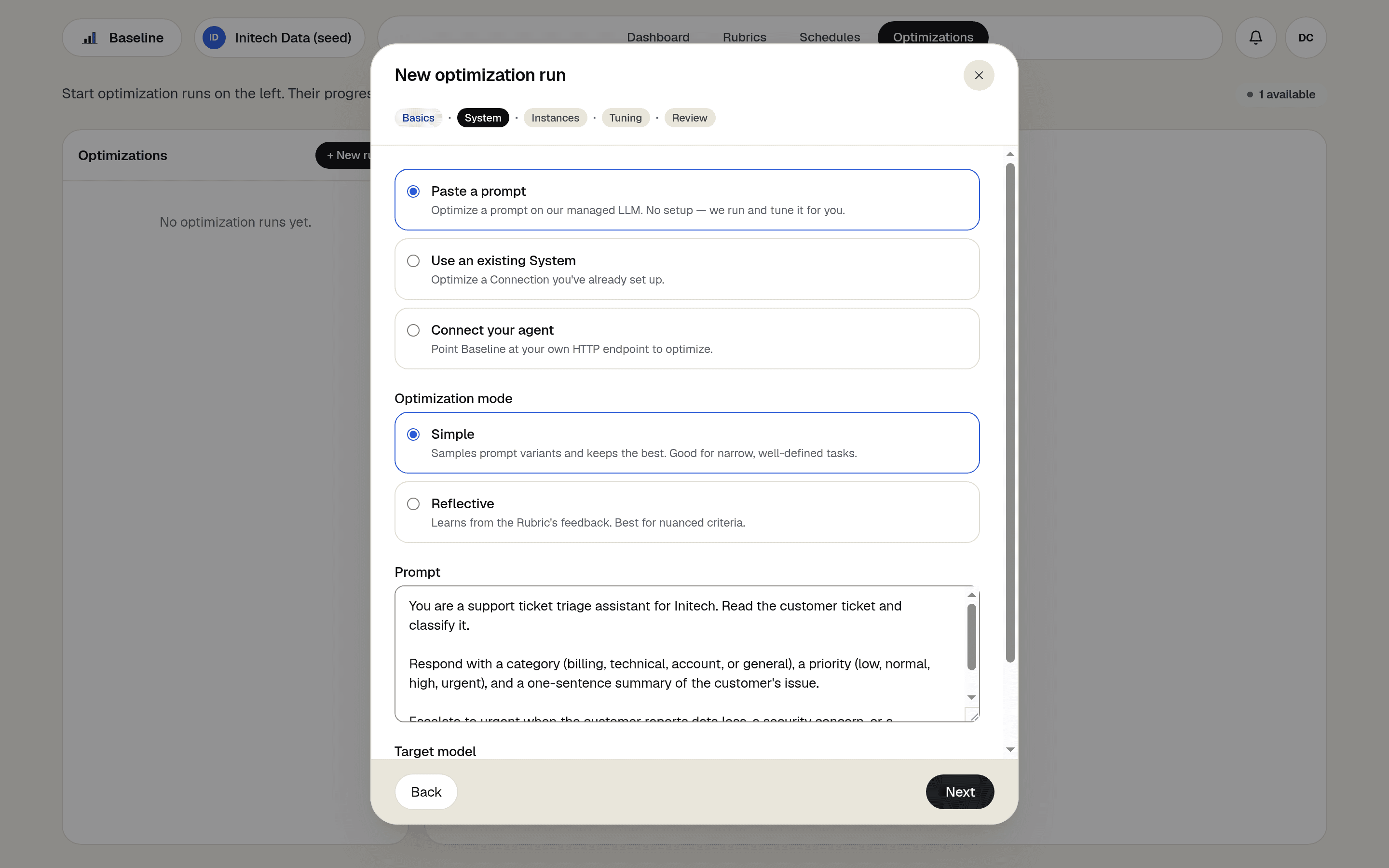
Paste your prompt and keep Simple selected
On the System step, choose Paste a prompt, drop in the prompt, and pick the model it should run on: Haiku 4.5 by default, or Sonnet 4.6 or Opus 4.8. Simple is preselected as the Mode; Reflective is one click away when the task needs it.
Add the test inputs
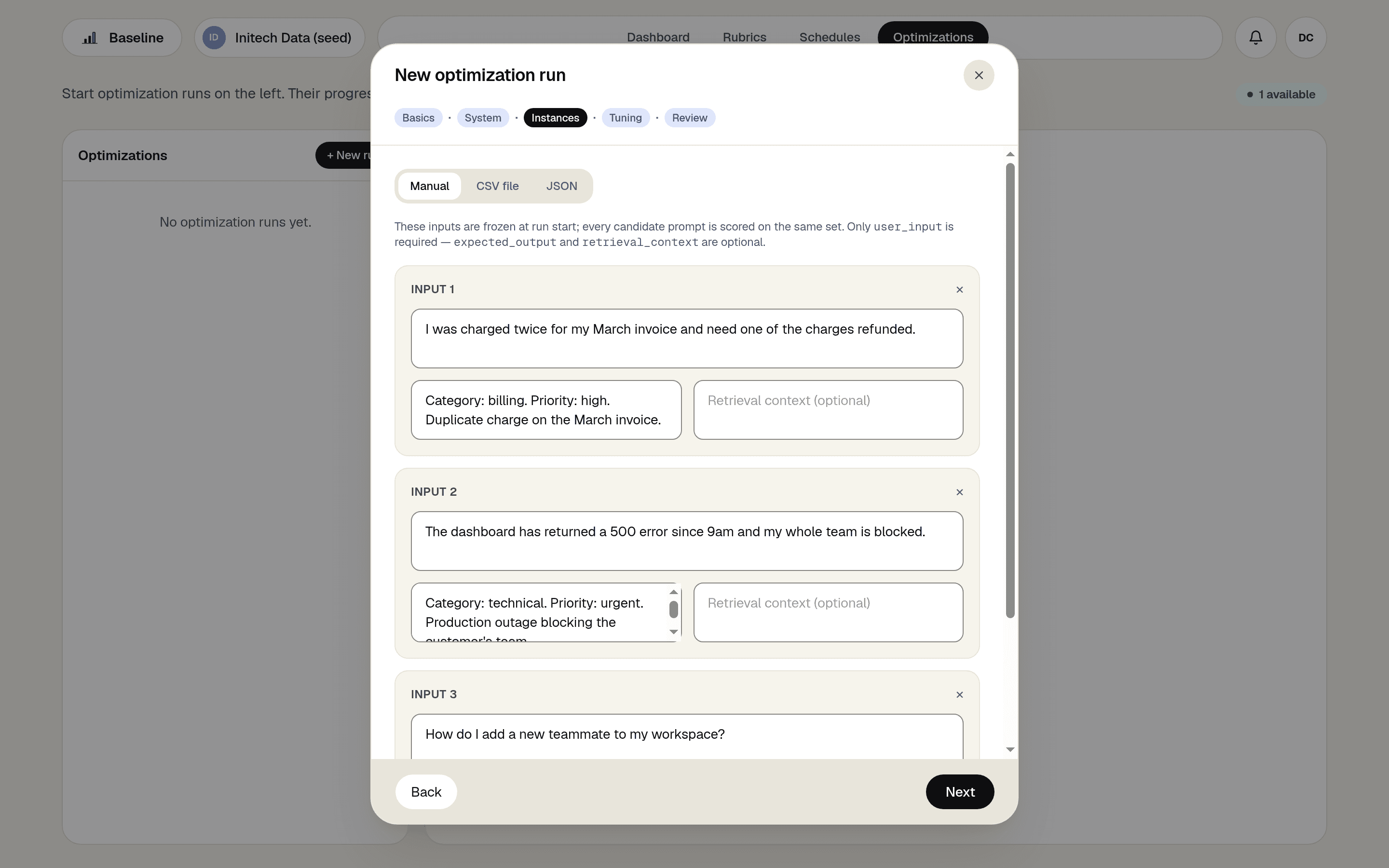
Enter up to 50 Instances by hand, or upload them as CSV or JSON. Only the user input is required; an expected output and retrieval context are optional. The set freezes when the run starts, so every Candidate is judged on identical inputs.
Set the budget, and tune the rest only if you want to
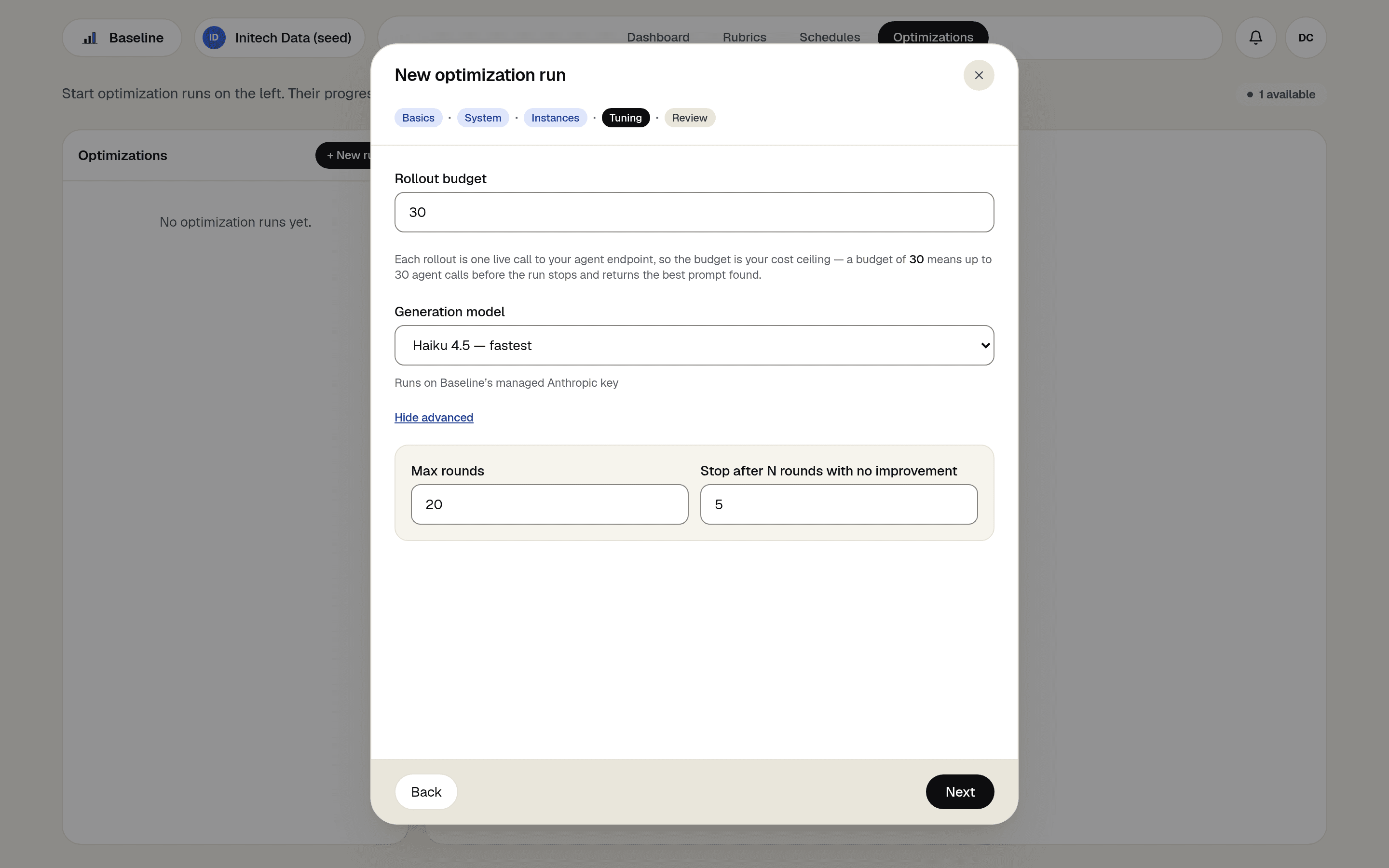
The rollout budget caps scored calls: one rollout is one Candidate scored on one Instance, the default is 30, and your plan sets the per-run maximum (200 on Builder, 400 on Scale). Advanced settings hold the rewrite model (the fast model by default), the round cap (20), and the early stop after rounds without improvement (5).
Review, start, and collect the winner
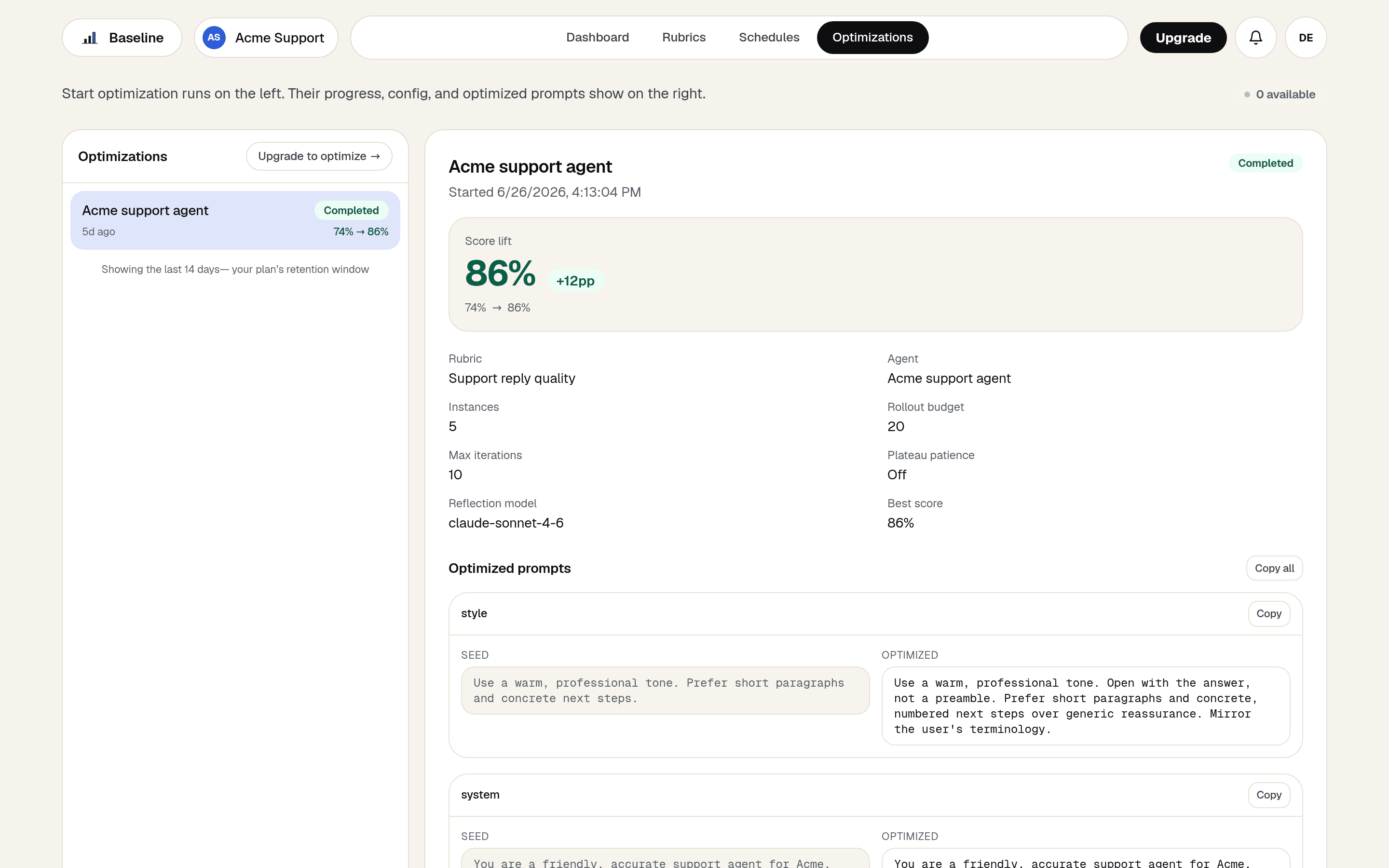
The Review step shows the Mode, the Instance count, the budget, and whether the run uses an included Optimization Run or meters Eval Points. When the run completes you get before and after scores and the optimized prompt beside your original, ready to copy out.
How Baseline does it
Rubrics
Your definition of quality is the run's fitness function: every rewrite is scored against the same criteria your Eval Runs already use.
Managed Agents
Baseline runs the pasted prompt on a managed model, so there is no endpoint to build and nothing to deploy before you can optimize.
Optimization Runs
A Simple run draws from your plan's monthly run allowance like any Mode, and the rollout budget keeps its cost bounded before it starts.
Reflective Mode
The same wizard offers the feedback-driven Mode when your Rubric's criteria get nuanced, so outgrowing Simple is a one-click switch.
What you get
- Improve a prompt without connecting an agent or writing an endpoint.
- A measured before-and-after score against your own Rubric, on the same inputs.
- One decision to make: the budget. Sensible defaults handle the rest.
- A clear upgrade path to feedback-driven optimization when the task outgrows score-only search.
Frequently asked questions
- When should I use Reflective Mode instead?
- When the Rubric measures nuanced qualities, such as tone, empathy, or multi-part instructions that interact. Reflective reads the judge's written reasoning and proposes prompts informed by it. Simple is the better fit when the score alone captures success.
- How should I size the rollout budget?
- Every Candidate is scored once per Instance, and your Instance count is simply how many test rows you added on the Instances step. So with 10 Instances, each rewrite costs 10 rollouts, and scoring your original prompt at the start costs the same 10. To size the budget, count the prompts you want scored (your original plus every rewrite) and multiply by your Instance count. For example: trying 24 rewrites (three full rounds of 8) on 10 Instances means 25 scored prompts, so set a budget of 250.
- Why don't I see Simple Mode in my wizard?
- Simple Mode is offered for pasted prompts, which run as Managed Agents on Baseline's own key, a paid-plan feature. Agents connected over your own endpoint optimize with Reflective Mode.
- What does a run cost?
- One Optimization Run from your plan's monthly allowance (15 on Builder, 75 on Scale); past the allowance a paid run meters Eval Points per scored rollout instead, and the Review step tells you which applies before you start. Model tokens run on your own provider key when you've saved one, otherwise on Baseline's managed key at provider cost plus your plan's markup, reserved against your Managed Spend Cap.
- What happens if a run hits the spend cap partway through?
- The run fails immediately and your original prompt stays in place, so a capped run never quietly reports your unchanged prompt as an optimized result. Raise the cap or wait for the next period, then run again.